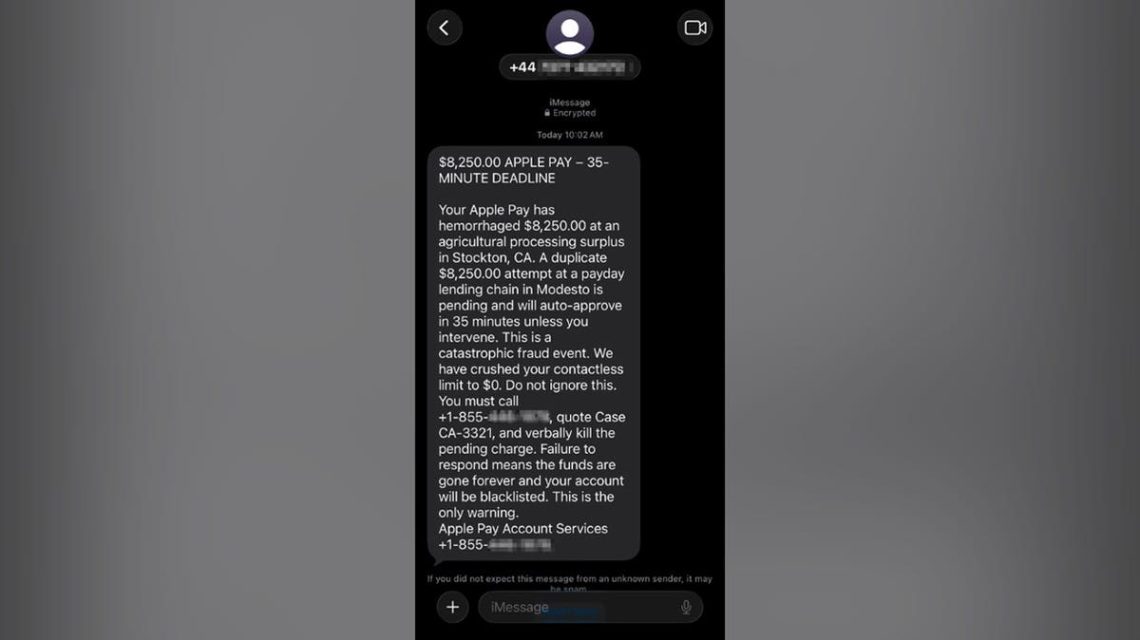
Paul C., a resident of Washington, D.C., was startled by a text message claiming that Apple Pay had charged him $8,250 and would charge another $8,250 in 35 minutes. These types of messages are crafted to cause panic quickly.
Paul acted wisely; he did not call the number provided and instead shared the message with us. Let’s dissect every suspicious element of the message and explain how to verify charges securely without falling for a scammer’s tricks.
Understanding the Apple Pay Scam Text
The message Paul received alleged a charge of $8,250 had occurred via Apple Pay and warned of another identical charge scheduled soon. It instructed him to call a specific number to prevent ‘auto-approval’ and provided a case number for reference. Here are the questionable aspects:
- Mismatched Numbers: The message originated from a UK code but directed Paul to call a U.S. number, raising suspicions since legitimate services usually provide consistent contact details.
- Forged Trust: The frequent mention of ‘Apple Pay’ and the use of encryption in the message aimed to create false credibility, although encryption alone does not verify authenticity.
- Intentional Panic: The inclusion of a large sum and a tight deadline is designed to incite fear and rush decision-making.
- Uncharacteristic Language: Terms like ‘hemorrhaged money’ and ‘kill the pending charge’ are overly dramatic and unlike typical financial alerts.
- Vague Merchants: Alleged transactions were linked to nonspecific entities using general industry and city names.
- Contradictory Claims: The message implied contradictory scenarios, highlighting its fabricated nature.
- Directed Actions: Every instruction steered Paul toward contacting the scammer, rather than authentic account verification methods.
How the Scam Functioned
The text was a lure to initiate further interaction. By calling the number, victims might provide personal information or be guided through actions that would compromise their accounts. Scammers can manipulate this contact to gain card details, verification codes, or install malware.
“The FTC warns of fake support agents possibly seeking remote access, card details, or influencing funds movement,” noted a report.
Steps for Verifying Apple Pay Charges
To verify a charge, avoid calling any phone numbers mentioned in unsolicited texts:
- Utilize your iPhone’s Wallet app to track recent transactions.
- Access your bank’s official app for a comprehensive transaction history.
- Contact your bank through official numbers listed on credit cards.
Apple’s Wallet may not capture every transaction, so always double-check with your financial institution if uncertainties arise.
Reporting Apple Pay Scam Texts
Here’s how to report these messages:
- Capture a screenshot with sender information.
- On iPhones, look for options like ‘Report Spam’ or ‘Report Junk.’
- Email the screenshot to [email protected].
- Forward the text to 7726 (SPAM) to alert authorities.
- File a detailed report via ReportFraud.ftc.gov.
Actions If You Contacted Scammers
If you’ve mistakenly engaged with scammers, immediate action is crucial depending on what information you disclosed:
- Phone Call Only: Block the contact number and remain vigilant for any follow-up attempts.
- Shared Financial Details: Reach out to your bank immediately to safeguard your account.
- Compromised Apple Account: Change your Apple ID password, ensure two-factor authentication is active, and review linked devices.
- Verification Code Provided: Alert the associated service promptly without delay.
- Installed Unwanted Software: Disconnect from the internet, uninstall the program, and scan your device with a reliable antivirus.
- Exposed Social Security Number: Place a credit freeze with major credit bureaus and monitor reports for unauthorized accounts.
Minimizing Scam Risks
Protect yourself with these precautions:
- Exercise Caution: Take your time to verify alerts independently.
- Use Trusted Channels: Verify account activities using apps or contact numbers you trust, not those provided in unsolicited messages.
- safe Information: Never share security codes or allow remote access to unknown parties.
- Strengthen Security: Equip devices with up-to-date antivirus software to detect fraudulent sites and defend against malicious threats.
- Data Privacy: Utilize data removal services to limit your exposure on search sites and protect personal information.
- Monitor Identity: If susceptible to scams, identity theft protection can provide timely alerts for new credit accounts and data breaches.
Reporting suspicious messages assists Apple and service providers in combating scams. Remember: always authenticate alerts using official, known channels rather than unfamiliar messages.
For those who’ve encountered convincing scam attempts, consider sharing your experiences with vigilant communities. Protect yourself and others by spreading awareness of the warning signs and response measures effectively.
 Trump Unveils AI-Powered America.gov Platform
  Trump’s 2024 Campaign Targets Young Men Through Cryptocurrency
  How Modern Windows Improve Home Insulation
  State Department Simplifies Passport Process with Online Applications
  Senate Democrats Block Data Center Bill Over Efficiency Concerns
  Future Cities: Ambitious Projects Aiming for Innovation and Sustainability