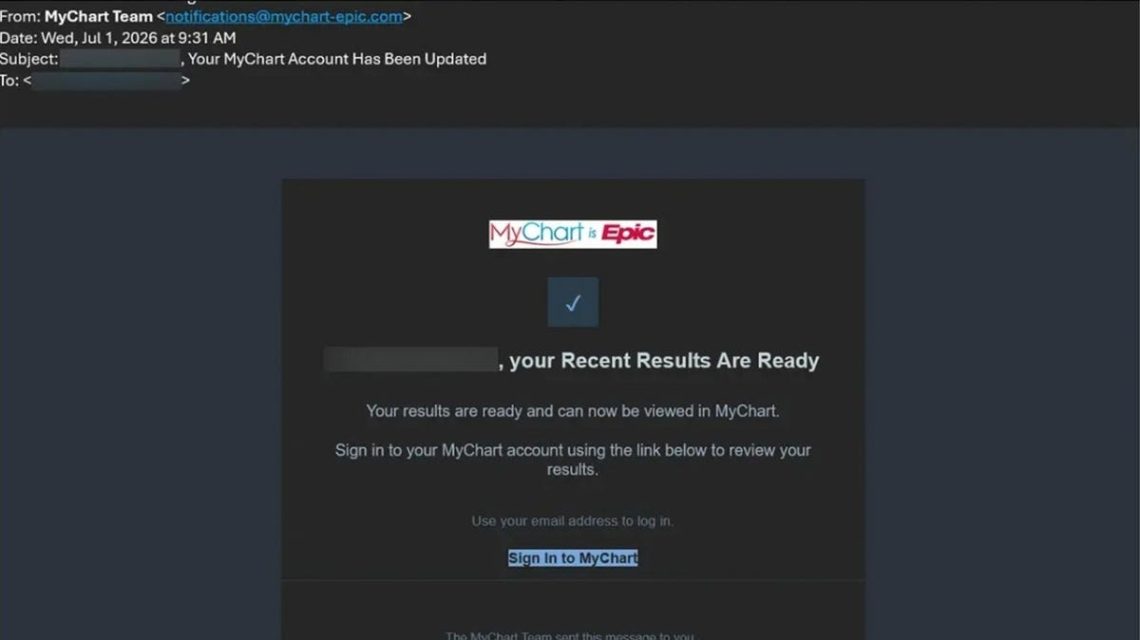
If you’ve accessed health information online through MyChart, you should be aware of potential phishing scams targeting this popular patient portal. MyChart, created by Epic Systems, is used by hospitals and medical practices to provide patients with online access to health data and communication with care teams.
Recognizing the MyChart Phishing Scams
Mary M.’s concerns about online patient communication highlight fears about scams targeting MyChart users. These scams involve criminals impersonating MyChart through phishing campaigns, not a breach of the platform itself.
Scammers use fake medical results and bogus offers to exploit patient portals. They may even distribute malware through Windows computers.
Recent Warnings About Phishing Campaigns
Several credible sources, like Penn Medicine and Pennsylvania Attorney General Dave Sunday, have warned about scams involving fake emails and text messages mimicking MyChart communications.
Epic Systems detailed two phishing campaigns, showing why caution around unexpected MyChart messages is essential.
The Fake MyChart Medical Results Scam
This scam begins with a convincing email claiming new medical results are available. The message includes MyChart branding and leads victims to a fake sign-in page that captures login credentials.
“Your recent results are ready.”
Entering information prompts the fake site to show a fabricated medical record, pressuring victims with alarming claims about their health. It falsely instructs users on how to complete a ‘verification step,’ a tactic to install malware.
Another Campaign: Medicare Health Kit Scam
Scammers offer a false ‘2026 Medicare Health Kit.’ Messages may claim winners, but links lead to fake surveys seeking personal and financial information.
No kit is ever sent, and scammers collect sensitive data, such as credit card details.
Why This Scam Is Effective
Patients often receive legitimate emails from healthcare providers, making it difficult to distinguish fake alerts from real ones. Scammers leverage fear and urgency to trick victims into reacting.
Protecting Yourself From Fake MyChart Alerts
- Open MyChart Independently: Access MyChart through the official app or bookmarked site, not via email links.
- Examine Sender Details: Verify full email addresses to spot inconsistencies with past communications.
- Avoid Running Commands: Do not execute computer commands initiated by patient portal messages.
- Enable Two-step Verification: Use 2FA to secure accounts further.
- Unique Passwords: Use dedicated passwords for MyChart, with a password manager for strength.
- Maintain Security Software: Strong antivirus tools protect against malware threats.
- Verify Claims Through Other Means: Cross-check any medical claims with your care team directly.
- Be Skeptical About Giveaways: MyChart does not offer free kits or packages; approach such emails with caution.
Steps After Interacting With a Scam
If you accidentally clicked on a fake link and entered details, take specific actions tailored to the situation:
- If Details Were Not Entered: Close the page without interactions and mark the email as junk.
- If Passwords Were Entered: Change your MyChart password through the official app.
- If Credit Card Info Was Entered: Contact your bank to discuss fraudulent activity.
- If Malware Was Downloaded: Disconnect the device, conduct anti-virus scans, and verify application integrity.
Key Takeaways
Continue to use MyChart as advised by healthcare providers but adopt cautious strategies for handling notifications. Prioritize independent verification of alerts through secure access points.
For more real-world guidance on spotting scams, visit CyberGuy.com and access the Ultimate Scam Survival Guide.
 Understanding Inflammation: Myths and Facts
  Calm Parenting: Strategies to Manage Stress
  Trump’s Executive Order to Combat Mosquitoes and Ticks in D.C.
  Overcoming Weight Loss Challenges: Brain Health and GLP-1 Medications
  Supporting Children’s Mental Health at Home: Practical Steps for Parents
  Abdul El-Sayed’s Strategy to Attract Health-Conscious Voters in Michigan